





 LISTEN
TO OUR SITE! (free)
LISTEN
TO OUR SITE! (free)
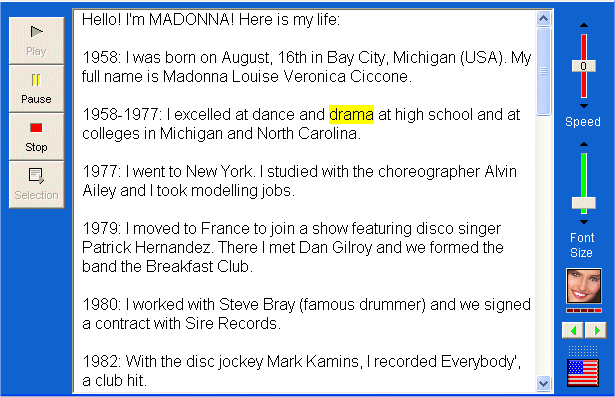
4 different people (2 men and 2 women) read out the page and underline the word which is being read. At any time, you can ask them to read a specific word or phrase.
INSTALLATION:
1) To listen to our pages, you must download ReadPlease 2002 Free edition (free) for your PC.
To download it, please visit one of these sites:
Warning: Windows XP user, you must 1) download this patch 2) run it before installing ReadPlease
Site n°1 - click on "DOWNLOAD NOW" in the right-hand corner.
Site n°2 - click on your country
WARNING: This software is pretty big (9 Mb). Please use a download accelerator (FlashGet/ReGet/Mass Downloader...) to get it more quickly.
Approximate time required (56Kb): 32 minutes
2) Run SetupReadPlease.exe which has just been downloaded.
The installation software will install 2 versions: the free version (FREE) and the commercial version (PLUS). We will use the free version.
10 Mb are necessary.
3) The installation software installs ReadPlease and creates icons on your desktop.
4) Run ReadPlease!
5) Here you are! You are ready!
You can now:
- listen to a whole text (copy and paste it into the main window)
- listen to a single word or phrase (click on the word, then on "Selection" on the left)
- listen to our pages. Please choose "Launch from its current location" after clicking on a special link.
TIPS:
Choose the character you prefer (4 characters)
Change the speed
Click here to listen to numbers 1
to 10
Choose: "Launch from its current location".
Tick the box "Don't ask again".
